
Topic 3: Misc. Questions
You are building an Azure Cognitive Search custom skill.
You have the following custom skill schema definition.
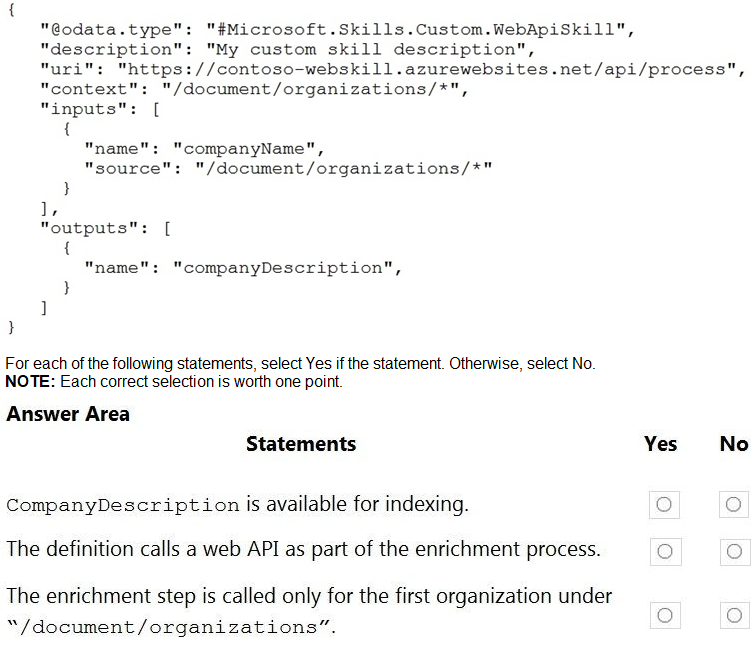
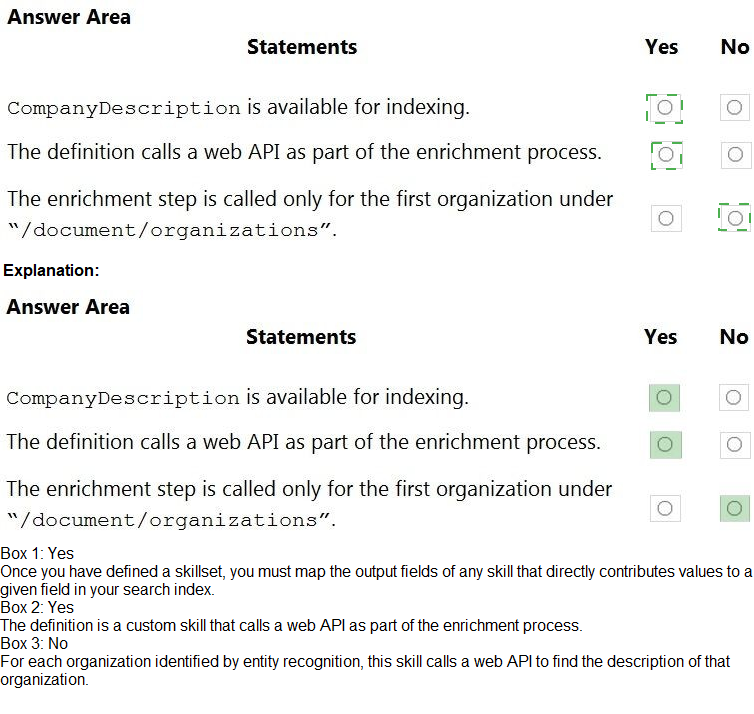
Statement 1: CompanyDescription is available for indexing.
Answer: No
Explanation:
The outputs section for companyDescription is incomplete—it is missing the required "source": property. A valid output must define where the output value comes from (e.g., "source": "/document/companyDescription"). Without a proper source, the output is not generated and thus not available for indexing.
Statement 2: The definition calls a web API as part of the enrichment process.
Answer: Yes
Explanation:
The "@data.type": "#Microsoft.Skills.Custom.WebApiSkill" explicitly indicates this is a custom web API skill. The uri property points to an external endpoint (https://contoso-webskill.azurewebsites.net/api/process). During enrichment, Cognitive Search will call this web API for each skill invocation, passing inputs and receiving outputs.
Statement 3: The enrichment step is called only for the first organization under /document/organizations.
Answer: No
Explanation:
The context property is set to "/document/organizations/*". The asterisk (*) indicates that the skill will be invoked for each organization in the array, not just the first. The skill executes once per element in the /document/organizations collection. To target only the first, you would use "/document/organizations/0".
Reference:
Microsoft Learn documentation: "Custom WebApiSkill schema", "Context property in Azure Cognitive Search skills", and "Output field mappings for custom skills"
You have 100 chatbots that each has its own Language Understanding model.
Frequently, you must add the same phrases to each model.
You need to programmatically update the Language Understanding models to include the
new phrases.
How should you complete the code? To answer, drag the appropriate values to the correct
targets. Each value may be used once, more than once, or not at all. You may need to drag
the split bar between panes or scroll to view content.
NOTE: Each correct selection is worth one point.
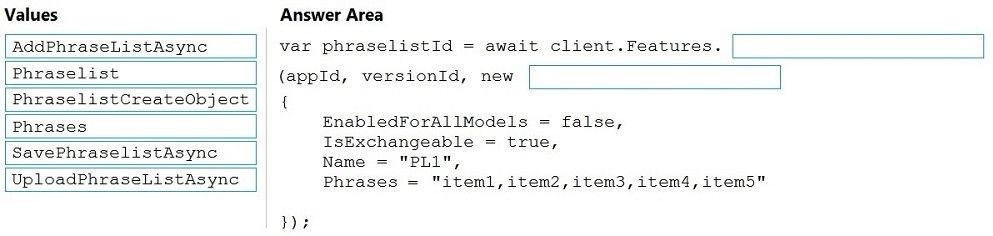
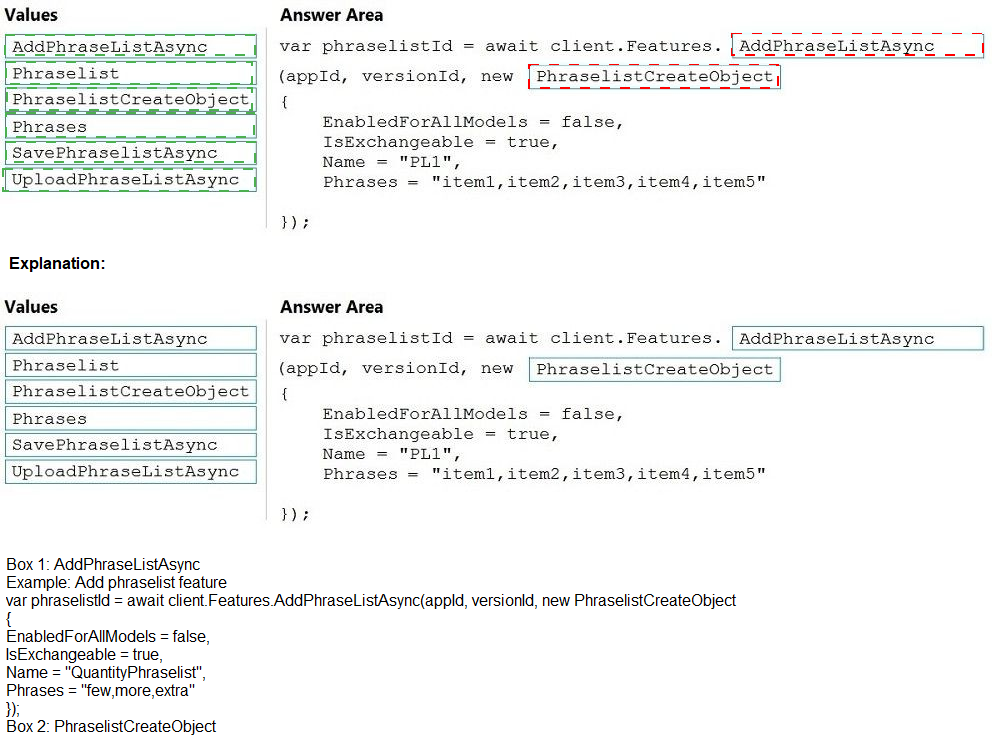
Explanation:
To add phrases to a LUIS model programmatically, you use the AddPhraseListAsync method, which creates a new phrase list. The PhraseListCreateObject contains the phrase list details: Name, Phrases (comma-separated), IsExchangeable (true for interchangeable phrases, false for non-exchangeable), and EnabledForAllModels (whether the list applies to all intents/models).
Correct Options (drag targets):
Method: AddPhraseListAsync
This is the correct LUIS SDK method to add a new phrase list to a Language Understanding model. SavePhraseListAsync and UploadPhraseListAsync are not valid methods in the LUIS authoring SDK. AddPhraseListAsync creates the phrase list and returns its ID.
Parameter object: PhraseListCreateObject
This is the correct class used to define a new phrase list. It contains properties like Name, Phrases, IsExchangeable, and EnabledForAllModels. The PhraseList (without "CreateObject") is not a valid constructor class for adding a new phrase list.
Property: Phrases
The Phrases property holds the comma-separated list of phrases (e.g., "item1,item2,item3,item4,item5"). This is the actual phrase content to be added. AddPhraseListAsync accepts a PhraseListCreateObject where this property is set.
Incorrect Options (not used):
AddPhraseListAsync – This is correct (used as the method).
PhraseListCreateObject – This is correct (used as the parameter type).
Phrases – This is correct (used as the property name for the phrase list content).
SavePhraseListAsync – This is not a valid LUIS SDK method. The correct method is AddPhraseListAsync for creation.
UploadPhraseListAsync – This is not a valid LUIS SDK method. There is no such method in the LUIS authoring API.
PhraseList – This is an incomplete class name. The correct class for creating a new phrase list is PhraseListCreateObject.
IsExchangeable – While this is a valid property of PhraseListCreateObject, it is not the property that holds the actual phrase list content. The question asks for where to put the phrases, so Phrases is correct.
EnabledForAllModels – This is a boolean property that determines if the phrase list applies to all models, but it does not hold the phrase content.
Name – This is a string property for naming the phrase list, not for storing the phrases themselves.
Reference:
Microsoft Learn documentation: "LUIS authoring SDK – AddPhraseListAsync method", "PhraseListCreateObject class", and "Programmatically manage phrase lists in LUIS"
You are building a chatbot by using the Microsoft Bot Framework Composer.
You have the dialog design shown in the following exhibit.

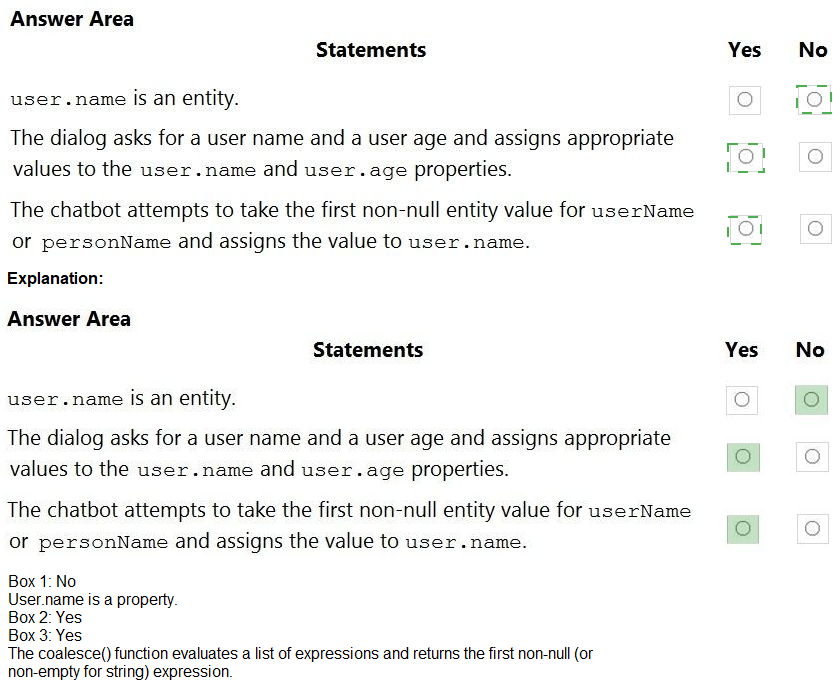
Statement 1: user.name is an entity.
Answer: No
Explanation:
In Bot Framework Composer, user.name is a property (a variable in the user memory scope), not an entity. Entities are extracted from user utterances using Language Understanding (LUIS). Properties store values during conversation flow (e.g., from prompt responses). The exhibit shows user.name as an output property from a text prompt, not as an entity.
Statement 2: The dialog asks for a user name and a user age and assigns appropriate values to the user.name and user.age properties.
Answer: Yes
Explanation:
The dialog clearly shows two prompts:
First: "What is your name?" → User input assigned to user.name
Second: "Hello $user.name, how old are you?" → User input assigned to user.age
Both properties receive values from user responses, as shown in the exhibit.
Statement 3: The chatbot attempts to take the first non-null entity value for userName or personName and assigns the value to user.name.
Answer: Yes
Explanation:
The exhibit shows a coalesce(@user.Name, @personName) expression in the Value field. The coalesce function returns the first non-null value from its arguments. This means the chatbot will look for entity values named user.Name or personName and assign the first non-null one to user.name. This is a common pattern for handling multiple possible entity names.
Reference:
Microsoft Learn documentation: "Bot Framework Composer – Memory scopes and properties", "Coalesce function in Bot Framework expressions", and "Prompt dialog property assignment"
What should you use to build a Microsoft Power Bi paginated report?
A.
Power BI Report Builder
B.
Charciculator
C.
Power BI Desktop
D.
the Power BI service
Power BI Report Builder
Explanation:
Power BI paginated reports are designed for printing or PDF generation with fixed layouts and exact formatting. They are built using Power BI Report Builder, a standalone desktop application. Report Builder is specifically designed for creating paginated reports (.rdl files) with table, matrix, chart, and free-form layouts optimized for print.
Correct Option:
A. Power BI Report Builder
Power BI Report Builder is the dedicated authoring tool for paginated reports. It provides a Microsoft Word-like design surface for creating pixel-perfect, page-ready reports. It supports parameters, data sources, datasets, and expressions. Paginated reports cannot be created in Power BI Desktop or the Power BI service.
Incorrect Options:
B. Charciculator –
This is not a valid Microsoft tool. It appears to be a misspelling or fictional name. There is no Microsoft product called "Charciculator" for report building.
C. Power BI Desktop –
Power BI Desktop is used to create interactive reports and dashboards with visualizations, slicers, and drill-downs. It does not create paginated reports (.rdl files). Paginated reports require Power BI Report Builder.
D. the Power BI service –
The Power BI service (app.powerbi.com) is a cloud platform for sharing, collaborating, and viewing reports. It can host and render paginated reports (Premium capacity required) but cannot author or create them from scratch.
Reference:
Microsoft Learn documentation: "What are paginated reports in Power BI?", "Power BI Report Builder overview", and "Differences between Power BI Desktop and Power BI Report Builder"
You are building a retail chatbot that will use a QnA Maker service.
You upload an internal support document to train the model. The document contains the
following question: "What is your warranty period?"
Users report that the chatbot returns the default QnA Maker answer when they ask the
following question: "How long is the warranty coverage?"
The chatbot returns the correct answer when the users ask the following question: 'What is
your warranty period?"
Both questions should return the same answer.
You need to increase the accuracy of the chatbot responses.
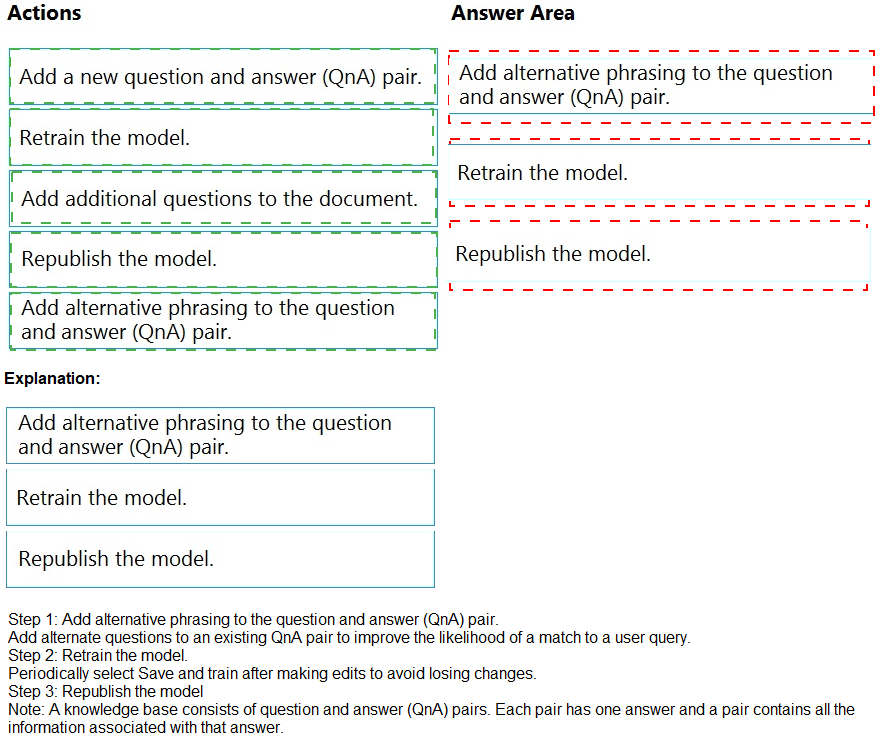
Which three actions should you perform in sequence? To answer, move the appropriate
actions from the list of actions to the answer area and arrange them in the correct order.
(Choose three.)

Explanation:
The chatbot fails to recognize "How long is the warranty coverage?" as equivalent to "What is your warranty period?" because the exact phrasing is not in the QnA pair. You need to add alternative phrasing (also called synonyms or similar questions) to the existing QnA pair. Then retrain the model to incorporate the new phrasing, and republish to make it live.
Correct Sequence (3 actions):
1. Add alternative phrasing to the question and answer (QnA) pair
In QnA Maker, each QnA pair can have multiple alternative questions (also called "similar questions") that map to the same answer. You add "How long is the warranty coverage?" as an alternative phrasing to the existing pair containing "What is your warranty period?" This teaches the model to recognize both phrasings.
2. Retrain the model
After adding alternative phrasing, you must retrain the QnA Maker model. Retraining updates the underlying natural language processing model to associate the new phrasing with the same answer. Without retraining, the model does not learn the new mapping.
3. Republish the model
Once retrained, you republish the model to the endpoint. Republishing makes the updated knowledge base (with the new alternative phrasing) available to the chatbot. Until republishing, the chatbot continues to use the older, less accurate version.
Incorrect or Out-of-Sequence Actions:
Add a new question and answer (QnA) pair – This would create a duplicate answer entry. The correct approach is to add alternative phrasing to the existing pair, not create a new pair. A new pair would waste resources and create maintenance overhead.
Add additional questions to the document – The original support document already contains the warranty question. Adding more questions to the source document requires re-uploading and re-processing the entire document, which is inefficient. Directly adding alternative phrasing in QnA Maker is faster and more precise.
Retrain before adding alternative phrasing – Retraining without adding the new phrasing first does nothing to improve accuracy. The model cannot learn what it has not been taught. The sequence must be: add phrasing → retrain → republish.
Republish before retraining – Republishing without retraining deploys the same unmodified model. The new alternative phrasing is not included, so the issue persists. Retraining must occur before republishing.
Reference:
Microsoft Learn documentation: "Add alternative questions to QnA Maker", "Train and republish a QnA Maker knowledge base", and "Improve QnA Maker accuracy with similar questions"
For each of the following statements, select Yes if the statement is true. Otherwise, select No.
NOTE: Each correct selection is worth one point.


Statement 1: Normalization involves eliminating relationships between database tables.
Answer: No
Explanation:
Normalization actually creates relationships between tables by breaking larger tables into smaller, related tables linked via foreign keys. It does not eliminate relationships. The goal is to reduce redundancy and dependency by organizing data into well-structured related tables, not to remove relationships.
Statement 2: Normalizing a database reduces data redundancy.
Answer: Yes
Explanation:
Normalization reduces data redundancy by ensuring each piece of data is stored only once. For example, instead of repeating customer addresses in every order record, normalization creates a separate Customers table linked by a foreign key. This eliminates duplicate data and saves storage space.
Statement 3: Normalization improves data integrity.
Answer: Yes
Explanation:
By reducing redundancy, normalization minimizes the risk of update anomalies (e.g., updating a customer address in one place but not another). It enforces referential integrity through foreign key constraints, ensuring that relationships remain consistent. This leads to more accurate and reliable data.
Reference:
Microsoft Learn documentation: "Database normalization overview", "Normalization forms (1NF, 2NF, 3NF)", and "Benefits of normalization"
You plan to build a chatbot to support task tracking.
You create a Conversational Language Understanding service named Iu1.
You need to build a Conversational Language Understanding model to Integrate into the
chatbot. The solution must minimize development time to build the model.
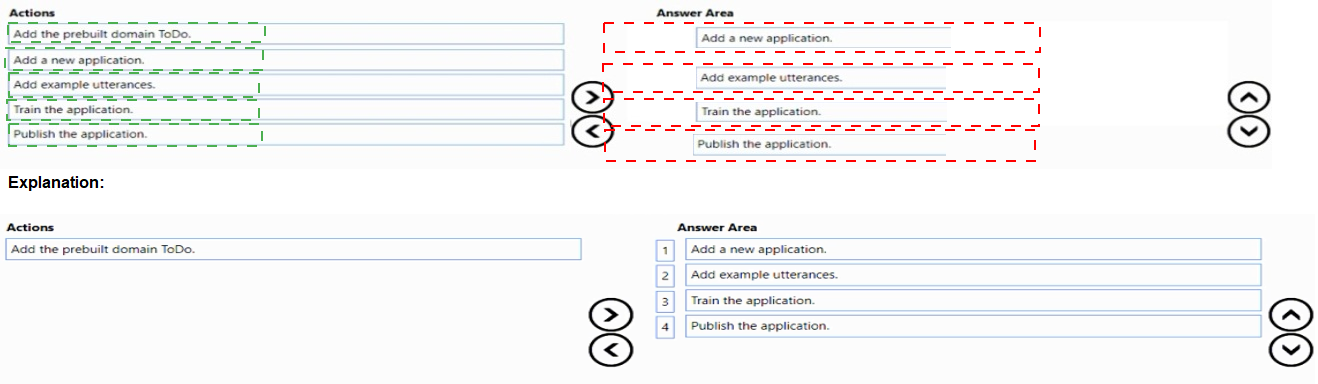
Which four actions should you perform In sequence? To answer, move the appropriate
actions from the list of actions to the answer area and arrange them in the correct order.

Explanation:
To minimize development time, you start with a prebuilt domain (ToDo), which comes with pre-defined intents and entities for task tracking. Then you add your own example utterances to customize the model. After training and publishing, the model is ready for integration. Creating a new application from scratch would take longer, so the prebuilt domain saves time.
Correct Sequence (4 actions):
1. Add the prebuilt domain ToDo
Prebuilt domains in Conversational Language Understanding provide ready-made intents (e.g., ToDo.Add, ToDo.Delete, ToDo.Update) and entities. Selecting the ToDo domain gives you a head start, significantly reducing development time compared to building from scratch.
2. Add example utterances
After adding the prebuilt domain, you add your own example utterances to train the model on your specific task-tracking scenarios. This customizes the prebuilt model to your exact needs, improving accuracy for your chatbot.
3. Train the application
Training processes the prebuilt domain data and your added utterances to create a language model. This step is required before the model can understand user input. Training typically takes a few minutes to complete.
4. Publish the application
Publishing makes the trained model available to your chatbot via the REST endpoint. After publication, you can integrate the model into your bot for real-time task tracking conversations.
Incorrect or Out-of-Sequence Action:
Add a new application – This action is not in the correct sequence because the scenario states "You create a Conversational Language Understanding service named lull," which implies the application already exists or is being created outside this sequence. Adding a new application would be the very first step before adding a prebuilt domain, but the question asks for four actions from the list, and "Add a new application" is unnecessary if the service is already created. The correct four actions are the ones listed above.
Reference:
Microsoft Learn documentation: "Prebuilt domains in Conversational Language Understanding", "ToDo prebuilt domain for task tracking", and "Train and publish a CLU model"
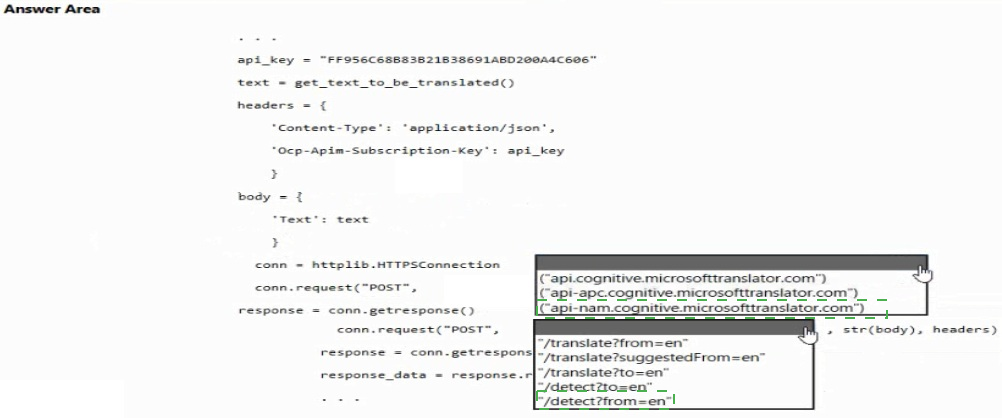
You are developing an application that includes language translation.
The application will translate text retrieved by using a function named
get_text_to_be_translated. The text can be in one of many languages. The content of the
text must remain within the Americas Azure geography.
You need to develop code to translate the text to a single language.
How should you complete the code? To answer, select the appropriate options in the
answer area.
NOTE: Each correct selection is worth one point.
Explanation:
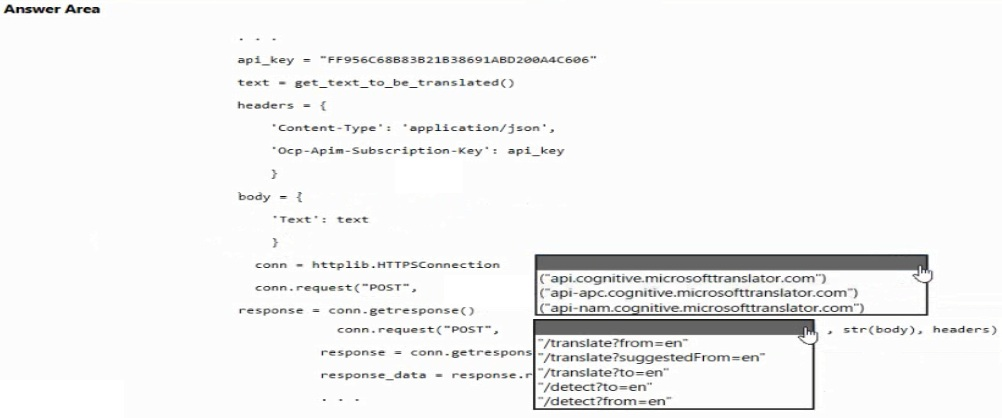
You need to translate text to a single language using the Translator service. To keep data within Americas geography, use the Americas regional endpoint (api-nam.cognitive.microsofttranslator.com). The /translate endpoint with a to parameter specifies the target language. Automatic source language detection is default, so from is optional.
Correct Options:
Hostname: api-nam.cognitive.microsofttranslator.com
The requirement states "content must remain within the Americas Azure geography." The regional endpoint api-nam.cognitive.microsofttranslator.com ensures data processing stays in North America. The global endpoint api.cognitive.microsofttranslator.com could route outside Americas. api-apc.cognitive.microsofttranslator.com is for Asia Pacific.
Endpoint: /translate?to=en
The /translate endpoint converts text from one language to another. The to=en parameter specifies the target language (English). The source language is auto-detected, so no from parameter is needed. /detect only identifies language without translating. suggestedFrom is for fallback scenarios, not primary translation.
Method call: conn.request("POST", endpoint, str(body), headers)
The code pattern shows conn.request("POST", ...) with endpoint, body, and headers. The correct syntax matches the incomplete line. The body contains the JSON with the Text property. The endpoint includes the path and query string (/translate?to=en). The headers include Ocp-Apim-Subscription-Key and Content-Type.
Incorrect Options:
Hostname: api.cognitive.microsofttranslator.com – This is the global endpoint, which may route traffic to any Azure geography. It does NOT guarantee data remains within Americas, violating the requirement.
Hostname: api-apc.cognitive.microsofttranslator.com – This is the Asia Pacific regional endpoint. Using this would process data in Asia, not Americas, violating the data residency requirement.
Endpoint: /translate?from=en – This specifies the source language as English but omits the target language. The API would not know what language to translate to. This is incorrect for translating to a single target language.
Endpoint: /translate?suggestedFrom=en – The suggestedFrom parameter is used when source language detection is uncertain, not as the primary translation direction. It does not replace the required to parameter.
Endpoint: /detect?to=en – /detect identifies the language of the input text and does not perform translation. The to parameter is invalid on the /detect endpoint. This would not translate anything.P
Endpoint: /detect?from=en – Similarly, /detect only returns language detection, not translation. The from parameter is irrelevant here. This does not meet the translation requirement.
Reference:
Microsoft Learn documentation: "Translator regional endpoints (nam, apc, eur)", "Translate text using Translator API", and "Automatic language detection in Translator"
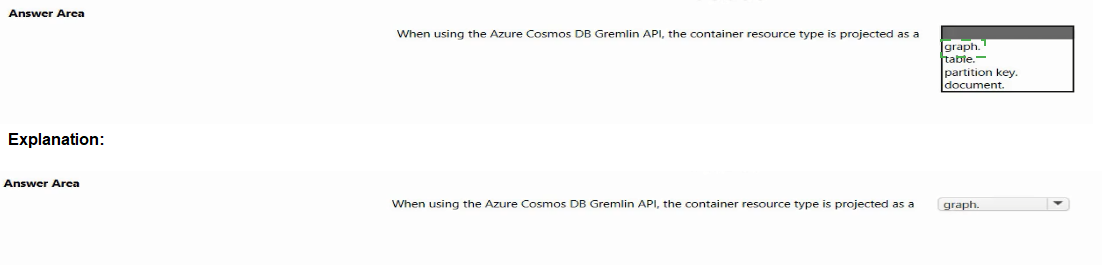
Select the answer that correctly completes the sentence.

Explanation:
Azure Cosmos DB Gremlin API is designed for graph databases. In this API, the container resource type is projected as a graph. Data is stored as vertices (nodes) and edges (relationships), enabling traversal queries using the Apache TinkerPop Gremlin query language. This is fundamentally different from document, table, or column-family models.
Correct Option:
graph.
The Gremlin API implements the graph data model. Each container in Gremlin API is a graph containing vertices and edges. Operations like g.V().has('name', 'Alice') traverse this graph structure. This contrasts with Core (SQL) API (documents), Table API (key/value), and Cassandra API (wide-column).
Incorrect Options:
table. – The Table API in Cosmos DB uses a key/value store with row/column structure, not the Gremlin API. The Gremlin API does not project containers as tables; tables are for the Table API or Azure Table Storage.
partition key. – A partition key is a property used to distribute data across physical partitions for scalability. It is not a container resource type. All Cosmos DB APIs use partition keys, but the container itself is not a partition key.
document. – The document data model is used by the Core (SQL) API in Cosmos DB. The Gremlin API projects containers as graphs, not documents. Documents contain JSON data; graphs contain vertices and edges.
Reference:
Microsoft Learn documentation: "Azure Cosmos DB Gremlin API overview", "Graph data model in Gremlin API", and "Container types across Cosmos DB APIs"
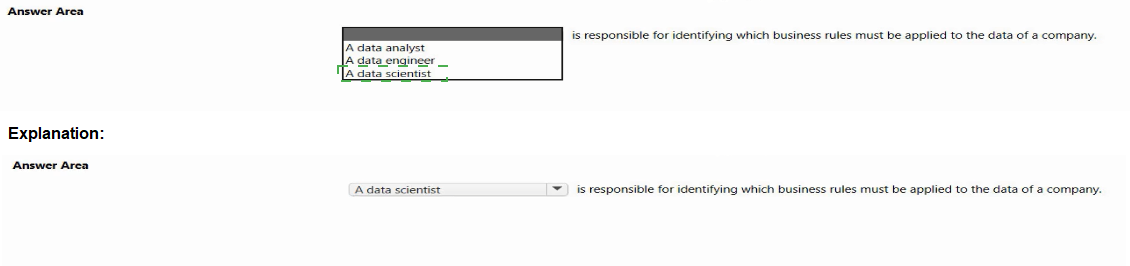
Select the answer that correctly completes the sentence.

Explanation:
A data analyst works closely with business stakeholders to understand requirements and identify which business rules must be applied to data for reporting and analysis. They translate business needs into data requirements, define validation rules, and ensure data aligns with business logic. Data engineers implement those rules, but analysts identify them.
Correct Option:
A data analyst
Data analysts bridge business and data. They gather requirements from stakeholders, identify business rules (e.g., "discount applies only to orders over $100"), and define how data should be transformed or filtered for insights. They focus on "what rules are needed" before engineers implement them in pipelines.
Incorrect Options:
A data engineer – Data engineers build and maintain data pipelines, ETL processes, and infrastructure. They implement business rules identified by analysts, but they are not primarily responsible for identifying which rules apply. Their focus is on technical execution and data integration.
A data scientist – Data scientists build predictive models, perform advanced statistical analysis, and create algorithms. They focus on machine learning, forecasting, and pattern discovery, not on identifying standard business rules for operational data processing. Their role is more exploratory and model-focused.
Reference:
Microsoft Learn documentation: "Data analyst roles and responsibilities", "Difference between data analyst, data engineer, and data scientist", and "Business rules in data analytics"
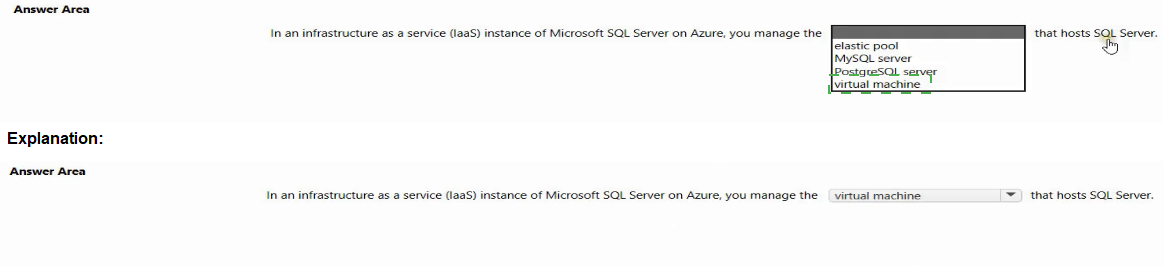
Select the answer that correctly completes the sentence.

Explanation:
In Infrastructure as a Service (IaaS), you manage virtual machines (VMs) that host software like SQL Server. An "IaaS instance of Microsoft SQL Server on Azure" means you provision a VM from the Azure Marketplace with SQL Server pre-installed or install SQL Server on a Windows VM. You are responsible for the VM, OS, and SQL Server configuration.
Correct Option:
virtual machine
IaaS provides compute, storage, and networking infrastructure. When deploying SQL Server on Azure IaaS, you create a virtual machine and install or use a pre-configured SQL Server image. You manage patching, backups, and high availability. The VM is the core resource that hosts SQL Server, distinguishing IaaS from PaaS (e.g., Azure SQL Database).
Incorrect Options:
elastic pool – An elastic pool is a PaaS (Platform as a Service) feature of Azure SQL Database, not IaaS. It allows multiple databases to share resources. Elastic pools are managed by Azure, not by the customer as an IaaS instance. This does not fit "IaaS instance of SQL Server."
MySQL server – Azure Database for MySQL is a PaaS offering, not IaaS. Customers do not manage the underlying VM. The question specifies "Microsoft SQL Server," not MySQL. MySQL is a different database product entirely.
PostgreSQL server – Azure Database for PostgreSQL is also a PaaS offering. It is not IaaS and not Microsoft SQL Server. The question specifically refers to "Microsoft SQL Server on Azure," so PostgreSQL is incorrect.
Reference:
Microsoft Learn documentation: "SQL Server on Azure Virtual Machines (IaaS) overview", "Differences between IaaS and PaaS for SQL Server", and "Azure SQL Database elastic pools vs SQL Server on VMs"
You are building a chatbot by using the Microsoft Bot Framework SDK.
You use an object named UserProfile to store user profile information and an object named
ConversationData to store information related to a conversation.
You create the following state accessors to store both objects in state.
var userStateAccessors = _userState.CreateProperty
var conversationStateAccessors =
_conversationState.CreateProperty
The state storage mechanism is set to Memory Storage.
For each of the following statements, select Yes if the statement is true. Otherwise, select
No.
NOTE: Each correct selection is worth one point.
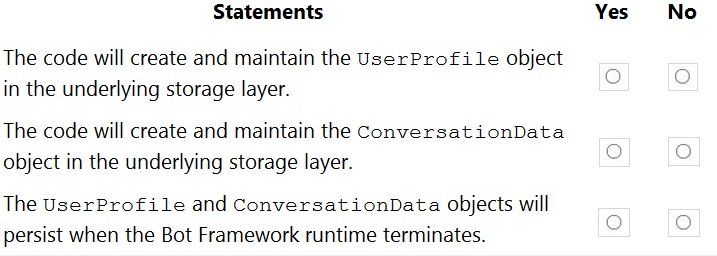
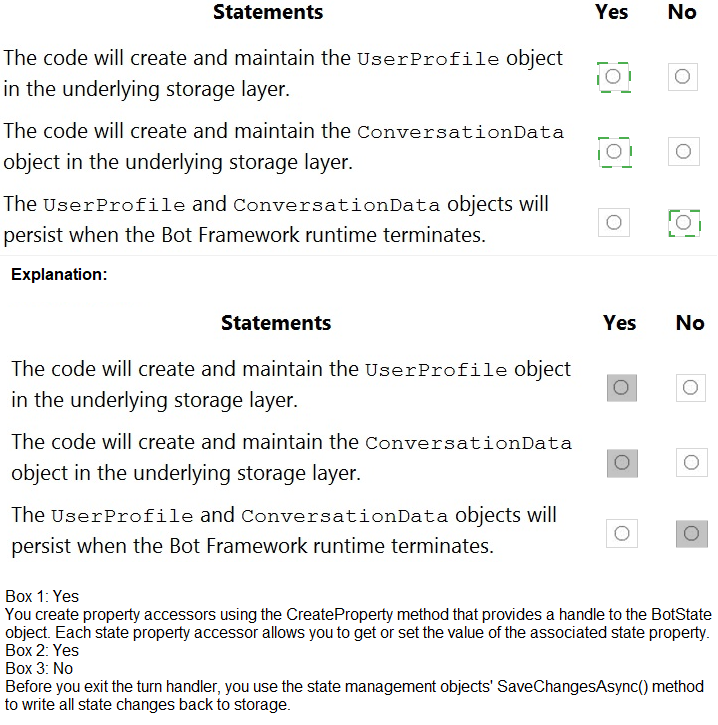
Statement 1: The code will create and maintain the UserProfile object in the underlying storage layer.
Answer: Yes
Explanation:
_userState.CreateProperty
Statement 2: The code will create and maintain the ConversationData object in the underlying storage layer.
Answer: Yes
Explanation:
_conversationState.CreateProperty
Statement 3: The UserProfile and ConversationData objects will persist when the Bot Framework runtime terminates.
Answer: No
Explanation:
Memory Storage stores state only in RAM. When the bot runtime terminates (process stops, app pool recycles, or container restarts), all in-memory data is lost. For persistence across restarts, you need a persistent storage layer like Azure Blob Storage, Cosmos DB, or SQL Server.
Reference:
Microsoft Learn documentation: "Bot Framework state management", "Memory Storage vs persistent storage", and "UserState and ConversationState overview"
| Page 8 out of 34 Pages |
| 345678910111213 |
| AI-102 Practice Test Home |
Real-World Scenario Mastery: Our AI-102 practice exam don't just test definitions. They present you with the same complex, scenario-based problems you'll encounter on the actual exam.
Strategic Weakness Identification: Each practice session reveals exactly where you stand. Discover which domains need more attention, before Designing and Implementing a Microsoft Azure AI Solution exam day arrives.
Confidence Through Familiarity: There's no substitute for knowing what to expect. When you've worked through our comprehensive AI-102 practice exam questions pool covering all topics, the real exam feels like just another practice session.
Copyright © All Rights Reserved